
Top Shopify Page Builder Apps (2026) — Build & Optimize Your Store Pages Without Code
 Deepak Kharware
In 2026, building a high-converting Shopify store is no longer about just launching products—it’s about how fast you can create, test, and optimize store pages without relying on developers. As competition increases and customer attention spans shrink, Shopify merchants need the ability to design landing pages, product layouts, and promotional sections quickly, while still maintaining performance and SEO.
This is where Shopify page builder apps have become essential. These tools allow store owners, marketers, and non-technical teams to design professional pages using drag-and-drop editors, pre-built sections, and conversion-focused layouts—without writing a single line of code. This guide explores the best Shopify page builder apps in 2026, explains which problems they solve, and helps you choose the right builder for your business stage.
Why Page Builder Apps Matter More in 2026
Shopify themes have improved significantly, but they are still designed to serve a broad audience. Modern stores, however, need campaign-specific landing pages, custom product storytelling, and A/B-tested layouts that themes alone cannot provide efficiently.
Page builder apps fill this gap by giving merchants control over layout, content hierarchy, and conversion elements—while keeping Shopify’s backend, checkout, and performance intact. In 2026, speed of execution is a competitive advantage, and page builders dramatically reduce time-to-market for new ideas.
Official Shopify customization overview:
https://help.shopify.com/en/manual/online-store/themes/customizing-themes
What Makes a Good Shopify Page Builder App
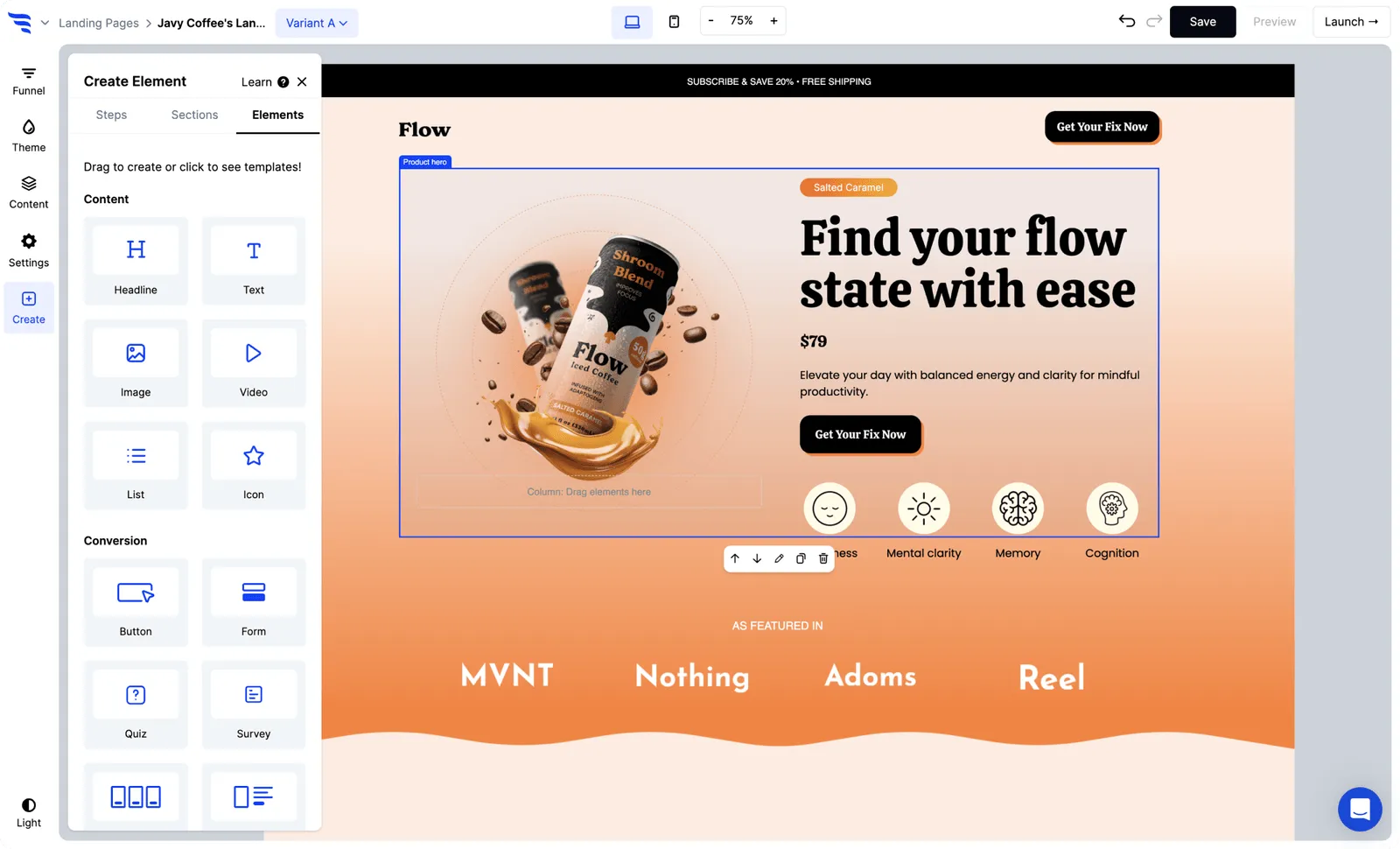
A strong page builder is not just about drag-and-drop convenience. It must respect Shopify’s performance standards, integrate cleanly with themes, support mobile optimization, and avoid bloating the store with unnecessary scripts.
In 2026, the best page builders focus on conversion-first design, Core Web Vitals, SEO-safe markup, and theme compatibility. Apps that ignore these aspects may look good visually but hurt long-term store growth.
Top Shopify Page Builder Apps to Use in 2026
PageFly – Advanced Control Without Code
PageFly is one of the most widely used page builders on Shopify, and in 2026 it remains a top choice for merchants who want deep layout control without development complexity. PageFly allows you to design custom product pages, landing pages, and homepage sections using a flexible editor that supports responsive layouts.
What makes PageFly stand out is its balance between freedom and structure. It offers enough customization to build unique experiences, while still maintaining compatibility with most Shopify themes. This makes it ideal for growing stores that want to experiment without rebuilding their entire theme.
PageFly app link:
https://apps.shopify.com/pagefly
GemPages – Conversion-Focused Page Building

GemPages is designed with performance marketing in mind. In 2026, GemPages is especially popular among DTC brands running paid ads, product launches, and promotional campaigns.
GemPages emphasizes pre-built templates optimized for conversions, such as product storytelling layouts, comparison sections, and urgency-driven CTAs. For merchants who want fast deployment and proven structures rather than unlimited customization, GemPages is a strong choice.
GemPages app link:
https://apps.shopify.com/gempage
Shogun – Professional Design with Brand Consistency

Shogun is often used by mid-to-large Shopify stores that prioritize brand consistency and collaboration. In 2026, Shogun has evolved into a polished page building platform with strong version control, reusable sections, and team workflows.
Shogun is particularly useful for businesses that want designers and marketers to collaborate safely without breaking layouts or performance. While it may be more structured than other builders, that structure helps prevent design chaos at scale.
Shogun app link:
https://apps.shopify.com/shogun
EComposer – Lightweight & Modern Builder
 EComposer has gained popularity in recent years due to its modern UI and lightweight approach. In 2026, EComposer appeals to merchants who want speed, simplicity, and minimal impact on site performance.
EComposer works well for stores that need clean layouts, fast load times, and essential customization—without the complexity of enterprise-level tools.
EComposer app link:
https://apps.shopify.com/ecomposer
How Page Builders Fit into Shopify’s Native Ecosystem
Shopify encourages customization through apps, but it also enforces strict quality standards. Page builders operate within Shopify’s ecosystem, meaning checkout, payments, and security remain fully managed by Shopify.
This is an important distinction. Unlike custom-coded pages on other platforms, Shopify page builders do not compromise PCI compliance or backend stability. When chosen wisely, they enhance flexibility without sacrificing trust or performance.
Shopify app quality standards:
https://shopify.dev/docs/apps/store/requirements
SEO & Performance Considerations in 2026
One of the biggest concerns merchants have is whether page builders hurt SEO. The answer depends on how the app is built and used. Modern Shopify page builders generate clean HTML, support metadata customization, and are compatible with Shopify’s sitemap and indexing system.
However, overusing animations, heavy scripts, or unnecessary sections can still impact Core Web Vitals. In 2026, the best practice is to use page builders strategically, focusing on key landing pages and conversion flows rather than rebuilding the entire store unnecessarily.
Shopify SEO guide:
https://help.shopify.com/en/manual/online-store/seo
Choosing the Right Page Builder for Your Store
The right page builder depends on your business stage. New stores benefit from simple builders with templates that reduce decision fatigue. Growing brands need flexibility for testing and optimization. Larger teams need governance, collaboration, and performance control.
There is no single “best” app—only the best fit for your workflow, traffic level, and growth strategy.
Common Mistakes to Avoid When Using Page Builders
Many stores install page builders and immediately redesign everything. This often leads to inconsistent UX and slower pages. A smarter approach is to use builders where they add the most value: landing pages, hero products, and campaign pages.
Another mistake is ignoring mobile design. In 2026, most Shopify traffic is mobile-first, and page builders must be tested thoroughly across devices.
Conclusion
In 2026, Shopify page builder apps are no longer optional tools—they are growth enablers. They allow non-technical teams to move fast, test ideas, and optimize conversions without compromising Shopify’s stability.
When chosen and used correctly, page builders help you build better pages, faster decisions, and more profitable stores—without code.


