
Headless Shopify Tutorial 2026: Complete Step-by-Step Guide to Build a Faster, Scalable Store
 Deepak Kharware
Headless commerce is no longer an experimental concept—it is becoming the default architecture for high-performance eCommerce. In 2026, more brands are choosing Headless Shopify to gain speed, flexibility, and full control over user experience across web, mobile, and emerging platforms. However, most tutorials online still explain headless Shopify in a fragmented or outdated way.
This guide is different. It explains what Headless Shopify really is, why it matters in 2026, and how to build a headless Shopify store step by step, using the latest Shopify tools, APIs, and best practices. Whether you are a developer, a store owner, or a technical founder, this guide will help you understand and implement headless Shopify correctly.
What Is Headless Shopify
Headless Shopify means separating the frontend (storefront) from the backend (Shopify admin, products, checkout, and orders). Instead of using Shopify’s traditional theme system, you build a custom frontend using modern frameworks while Shopify continues to manage products, inventory, payments, and checkout.
In this setup, Shopify acts as a commerce engine, not a presentation layer. The frontend communicates with Shopify using APIs, mainly the Storefront API, to fetch products, collections, and customer data.
Official Shopify overview:
https://www.shopify.com/enterprise/headless-commerce
When You Should (and Should Not) Use Headless Shopify
Headless Shopify is not for everyone. It is ideal for brands that care deeply about performance, customization, and scalability. Large catalogs, content-heavy stores, international brands, and experience-driven businesses benefit the most.
However, small stores or beginners may find headless unnecessary. Headless introduces development complexity and requires ongoing technical maintenance. Shopify themes are still excellent for many use cases.
Understanding this distinction is critical before starting.
Core Technologies Used in Headless Shopify (2026)
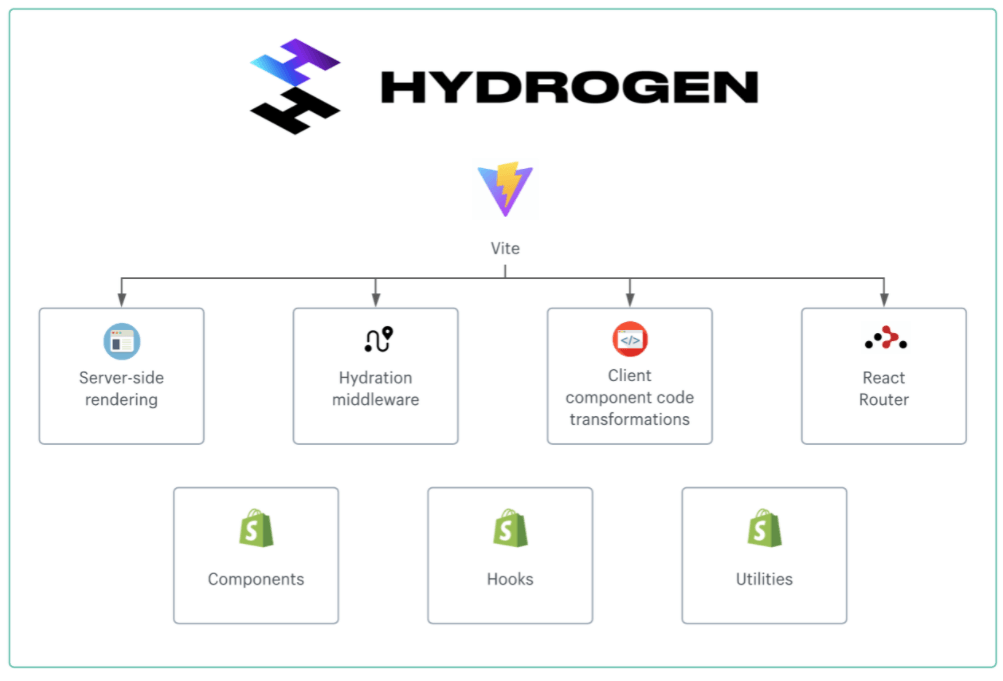
Headless Shopify in 2026 revolves around a few core technologies maintained or recommended by Shopify.
Shopify provides the backend, APIs, and checkout.
Hydrogen is Shopify’s official React-based framework for building headless storefronts.
Shopify Storefront API allows frontend apps to fetch products, collections, carts, and customer data securely.
Oxygen is Shopify’s edge hosting solution optimized for Hydrogen.
Hydrogen documentation:
https://shopify.dev/docs/custom-storefronts/hydrogen
Storefront API documentation:
https://shopify.dev/docs/api/storefront
Step-by-Step Headless Shopify Setup Guide (2026)

Step 1: Create a Shopify Store and Enable Custom Storefront Access
Start by creating a Shopify store as usual. From the Shopify admin, enable Custom Storefronts and generate a Storefront API access token. This token allows your frontend to securely access product and cart data.
Official guide: https://help.shopify.com/en/manual/custom-storefronts
Step 2: Set Up Hydrogen (Recommended Approach)
Hydrogen is Shopify’s official framework and is strongly recommended in 2026. It provides built-in performance optimizations, SEO handling, and seamless integration with Shopify APIs.
Install Hydrogen using Shopify CLI and scaffold a new project. Hydrogen handles routing, server-side rendering, and caching by default, which reduces setup complexity significantly.
Shopify CLI guide: https://shopify.dev/docs/apps/tools/cli
Step 3: Connect Storefront API to Your Frontend
Once Hydrogen is set up, configure your Storefront API token and store domain. This allows your frontend to fetch live data from Shopify.
At this stage, you will start writing GraphQL queries to retrieve products, collections, and cart information. Shopify provides ready-made query examples to speed up development.
Step 4: Build Product, Collection, and Cart Pages
Using Hydrogen components, create dynamic product pages that fetch data based on handles. Collections can be rendered with filters, sorting, and pagination.
Cart functionality is handled through Shopify’s cart APIs, ensuring accurate pricing, taxes, and inventory rules.
This is where headless Shopify truly shines—custom UX without backend limitations.
Step 5: Integrate Shopify Checkout
One of Shopify’s biggest advantages is checkout. Even in headless mode, checkout remains secure and hosted by Shopify.
You redirect users from your custom cart to Shopify checkout, preserving performance while avoiding compliance risks.
Checkout documentation:
https://shopify.dev/docs/api/storefront/latest/mutations/checkoutCreate
Step 6: Deploy Using Shopify Oxygen or External Hosting
In 2026, Oxygen is the preferred hosting for Hydrogen stores. It provides edge delivery, fast global performance, and native Shopify integration.
Alternatively, you can deploy to platforms like Vercel or Netlify, but Oxygen offers the tightest Shopify integration.
Oxygen guide: https://shopify.dev/docs/custom-storefronts/oxygen
SEO in Headless Shopify (What Changed Recently)
A common myth is that headless hurts SEO. In reality, headless Shopify can outperform traditional stores if implemented correctly.
Hydrogen supports server-side rendering, metadata management, and clean URLs. Shopify still generates sitemaps and handles structured product data.
In 2026, Google prioritizes Core Web Vitals, which headless storefronts often excel at due to optimized rendering and caching.
SEO documentation: https://help.shopify.com/en/manual/online-store/seo
Custom Headless Shopify vs Hydrogen: Which Headless Approach Is Best
Latest Headless Shopify Updates (2025–2026)
Shopify has significantly improved headless support with:
-
Faster Storefront API responses
-
Improved caching and edge rendering
-
Better cart and checkout APIs
-
Tighter Hydrogen + Oxygen integration
-
More control via Shopify Functions
These updates reduce the performance and complexity gap between traditional and headless setups.
Best Practices for Headless Shopify in 2026

Successful headless stores focus on simplicity. Avoid over-engineering features that Shopify already handles well. Keep checkout native, minimize API calls, and cache aggressively.
Security should never be ignored. API tokens must be protected, and customer data handled carefully.
Documentation-driven development is essential when working with evolving APIs.
Common Mistakes to Avoid
Many teams jump into headless without clear goals. This leads to over-complex builds that offer no real business benefit.
Another mistake is ignoring SEO fundamentals. Headless still requires structured metadata, internal linking, and content strategy.
Finally, skipping testing before launch can cause cart and checkout issues that impact revenue.
Conclusion
Headless Shopify in 2026 is no longer just for enterprise brands. With Hydrogen, Oxygen, and improved APIs, Shopify has made headless more accessible, faster, and more reliable than ever. However, success depends on understanding why you are going headless—not just how.
When built correctly, headless Shopify delivers unmatched performance, flexibility, and future-proof scalability.


