
Headless WooCommerce with Next.js: The Complete Guide 2026
 Deepak Kharware
Introduction:
Ecommerce in 2026 is no longer just about having an online store—it’s about delivering speed, flexibility, personalization, and omnichannel experiences. Traditional WooCommerce setups, where the frontend and backend are tightly coupled, often struggle to meet modern performance and scalability expectations. This is where Headless WooCommerce with Next.js becomes a game-changer.
A headless approach decouples the frontend (presentation layer) from the backend (WooCommerce). WooCommerce continues to manage products, orders, payments, and customers, while Next.js powers a blazing-fast, SEO-friendly frontend. This architecture gives developers and store owners complete freedom to design experiences without being limited by WordPress themes.
In 2026, with updates in Next.js App Router, React Server Components, Edge Rendering, and improvements in WooCommerce REST & Store APIs, headless WooCommerce is no longer “experimental”—it’s production-ready and future-proof.
What Is Headless WooCommerce?
Headless WooCommerce means using WooCommerce only as a backend commerce engine while the frontend is built using a modern framework like Next.js.
Instead of rendering pages via PHP and WordPress themes, your store works like this:
-
WooCommerce manages:
-
Products
-
Inventory
-
Orders
-
Payments
-
Customers
-
-
Next.js handles:
-
UI & UX
-
Routing
-
SEO
-
Performance optimization
-
API data fetching
-
Communication happens via REST API or Store API, making the system highly modular.
Why Choose Next.js for Headless WooCommerce?

Next.js has become the de-facto frontend framework for headless commerce. In 2026, it offers several advantages that perfectly align with WooCommerce.
Key Benefits
1. Superior Performance
Next.js supports Static Site Generation (SSG), Server-Side Rendering (SSR), and Incremental Static Regeneration (ISR). This means product pages load instantly and scale effortlessly.
2. SEO Excellence
Built-in SEO features like metadata APIs, dynamic meta tags, and structured data support help WooCommerce stores rank better on Google.
3. App Router & Server Components (2025–26 Update)
The App Router enables:
-
Cleaner routing
-
Better code splitting
-
Server-side data fetching without heavy client JS
4. Omnichannel Ready
Use the same WooCommerce backend for:
-
Web
-
Mobile apps
-
POS systems
-
Marketplaces
Headless WooCommerce Architecture Overview
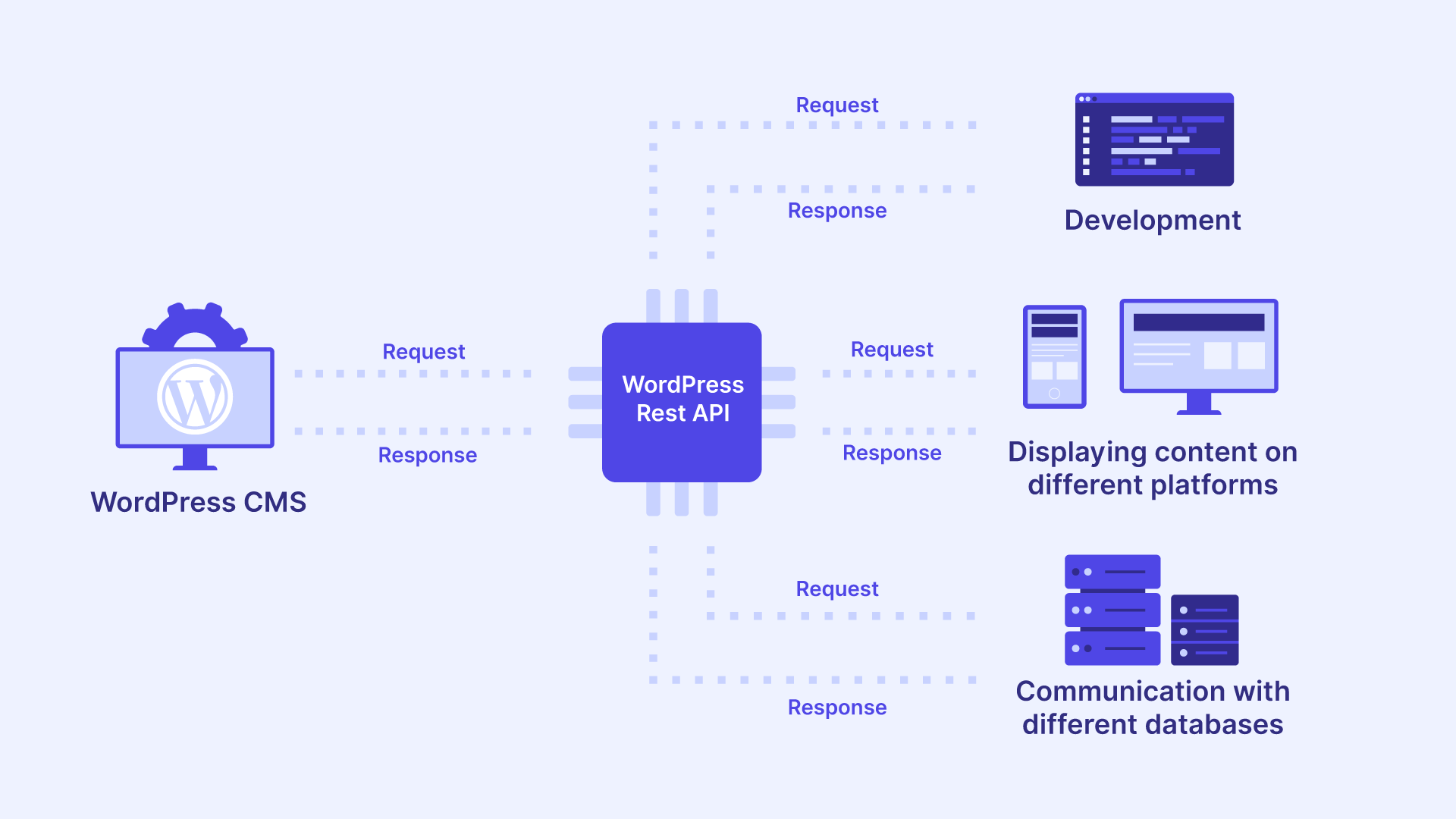
Typical Architecture Flow
-
WooCommerce Backend
-
WordPress + WooCommerce
-
Stores products, orders, customers
-
-
API Layer
-
WooCommerce REST API
-
WooCommerce Store API (optimized for frontend use)
-
-
Next.js Frontend
-
Fetches data via APIs
-
Renders UI using React & Server Components
-
-
Hosting
-
Frontend: Vercel / Netlify
-
Backend: Managed WordPress hosting
-
This separation ensures better security, performance, and scalability.
Setting Up WooCommerce for Headless Mode
Step 1: Install and Configure WooCommerce
Ensure WooCommerce is fully set up with:
-
Products
-
Payment gateways
-
Shipping rules
-
Taxes
Step 2: Enable REST API Access
WooCommerce REST API is enabled by default. Generate API keys from:
WooCommerce → Settings → Advanced → REST API
Step 3: Secure Your API
Best practices:
-
Use read-only keys for product fetching
-
Restrict write access for orders
-
Enable HTTPS
-
Use Application Passwords (WordPress 6+)
Setting Up Next.js for Headless WooCommerce

Step 1: Create a Next.js App
npx create-next-app woo-headless-store
cd woo-headless-store
npm run dev
Step 2: Configure Environment Variables
NEXT_PUBLIC_WC_API_URL=https://yourstore.com/wp-json/wc/v3
WC_CONSUMER_KEY=ck_xxxxxxxxx
WC_CONSUMER_SECRET=cs_xxxxxxxxx
Step 3: Fetch Products from WooCommerce
export async function getProducts() {
  const res = await fetch(
    `${process.env.NEXT_PUBLIC_WC_API_URL}/products`,
    {
      headers: {
        Authorization:
          "Basic " +
          Buffer.from(
            `${process.env.WC_CONSUMER_KEY}:${process.env.WC_CONSUMER_SECRET}`
          ).toString("base64"),
      },
      cache: "no-store",
    }
  );

  return res.json();
}
Store API vs REST API (2026 Update)
WooCommerce introduced major improvements to the Store API, making it the preferred option for headless frontends.
REST API
-
Full CRUD operations
-
Ideal for admin tools
-
Requires authentication
Store API (Recommended)
-
Optimized for frontend use
-
No authentication required for public data
-
Faster & cache-friendly
In 2026, Store API is faster, more secure, and supports carts & checkout flows better than ever.
Checkout & Cart in Headless WooCommerce
Checkout is often the hardest part of headless commerce.
Popular Approaches
-
Custom Checkout (Fully Headless)
-
Build cart & checkout UI in Next.js
-
Use Store API endpoints
-
Maximum control & branding
-
-
Hybrid Checkout
-
Custom frontend
-
Redirect to WooCommerce checkout page
-
Faster implementation
-
2026 Update:
WooCommerce now supports session-based carts via Store API, reducing complexity for fully headless checkouts.
Authentication & User Accounts
For customer login and accounts:
-
Use JWT Authentication
-
Or WordPress Application Passwords
-
Store session tokens securely
Many headless stores now use:
-
Magic links
-
OTP login
-
Social login (Google, Apple)
SEO Strategy for Headless WooCommerce
SEO is one of the biggest concerns with headless setups—but Next.js solves it well.
SEO Best Practices
-
Use Server-Side Rendering for product pages
-
Generate dynamic meta tags
-
Add JSON-LD structured data
-
Optimize images using Next.js Image
-
Use clean URLs and breadcrumbs
In 2026, Google fully supports JavaScript-rendered sites, making Next.js a safe SEO choice.
Performance Optimization Techniques
-
Enable ISR for product pages
-
Cache API responses
-
Use CDN (Vercel Edge)
-
Lazy load images
-
Reduce client-side JavaScript
Many headless WooCommerce stores report:
30–60% faster load times compared to traditional themes.
Security Benefits of Headless WooCommerce
-
No direct WordPress exposure on frontend
-
Reduced attack surface
-
API-based access control
-
Better DDoS protection with CDN
New Updates in 2025–2026 You Should Know
Next.js Updates
-
Stable App Router
-
React Server Components by default
-
Improved Edge Middleware
-
Faster builds and caching
-
Better SEO metadata API
WooCommerce Updates
-
Enhanced Store API
-
Better cart & checkout endpoints
-
Improved performance for large catalogs
-
Stronger compatibility with headless setups
These updates make headless WooCommerce more reliable than ever.
Reference URLs (Official & Trusted)
Conclusion:
Headless WooCommerce with Next.js is no longer just a trend—it’s a strategic advantage in 2026. With faster performance, better SEO, flexible UI, and future-ready architecture, it empowers brands to build modern commerce experiences without limitations.
If you’re planning a high-performance ecommerce store or migrating from a traditional WooCommerce theme, going headless with Next.js is one of the smartest decisions you can make today.


