
Shopify vs Webflow (2026): How to Build, Scale & Grow Your Website Without Coding
 Deepak Kharware
Building a professional website no longer requires coding skills—but choosing the right no-code platform determines whether your website merely exists or actually grows into a profitable, scalable business. Two platforms dominate this space: Shopify and Webflow.
While both allow you to build websites without code, they solve very different problems. Shopify is built for commerce-first businesses, while Webflow is built for design-first websites. This guide explains the real differences, not surface-level features, and helps you decide which platform is right for your goals—especially if you want to grow without touching code.
The Core Difference Between Shopify and Webflow (Most Blogs Miss This)
The real difference between Shopify and Webflow is what they automate for you.
Shopify automates commerce complexity—payments, checkout, taxes, inventory, security, scalability, and compliance. Webflow automates design and layout control, giving creators pixel-level freedom without code.
This difference affects everything: how fast you launch, how you scale, how much technical responsibility you carry, and how easy it is to grow revenue.
Building a Website Without Coding: Shopify vs Webflow
Building With Shopify (No-Code, Business-First)
Shopify allows anyone to launch a store using ready-made themes, visual editors, and page builder apps. You don’t worry about hosting, security, or performance—Shopify manages it all.
You focus on:
-
Products
-
Pages
-
Content
-
Marketing
Shopify is ideal if your website’s main goal is selling products or services.
Official Shopify overview:
https://www.shopify.com/
Building With Webflow (No-Code, Design-First)
Webflow gives you full visual control over layout, animations, typography, and structure—without writing HTML or CSS. It’s extremely powerful for designers, agencies, and content-driven brands.
Webflow is best for:
-
Marketing websites
-
Landing pages
-
Blogs
-
Portfolio sites
-
SaaS websites
Official Webflow overview:
https://webflow.com/
Ease of Use for Beginners (2026 Reality)
Shopify is easier for non-technical business owners. Its UI is designed for merchants, not designers. You can launch faster with fewer decisions.
Webflow has a steeper learning curve. While it’s no-code, it still requires understanding layout concepts like flexbox and responsive behavior. Designers love this control, but beginners may feel overwhelmed.
Beginner takeaway:
If your goal is selling → Shopify
If your goal is visual storytelling → Webflow
Scaling & Growth Without Coding
How Shopify Scales Without Code
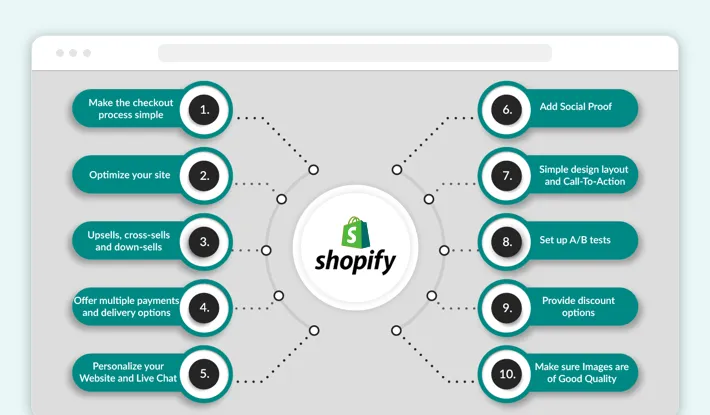
Shopify is built to scale automatically. Traffic spikes, international sales, payments, and checkout performance are handled by Shopify’s infrastructure.
Growth tools include:
-
App ecosystem
-
Email & SMS integrations
-
SEO-friendly structure
-
Global payments
-
Multi-currency selling
This makes Shopify ideal for long-term business growth.
Shopify scalability guide:
https://www.shopify.com/enterprise
How Webflow Scales Without Code
Webflow scales well for content and traffic, but not for complex commerce. Its CMS and hosting are fast and reliable, but advanced eCommerce features require workarounds or third-party tools.
Webflow excels at:
-
SEO-driven content growth
-
Marketing funnels
-
Brand storytelling
-
High-performance landing pages
Webflow CMS guide:
https://university.webflow.com/
SEO Capabilities: Shopify vs Webflow in 2026

Webflow offers deep SEO control, including custom meta tags, clean URLs, schema customization, and full control over HTML structure.
Shopify offers structured SEO, meaning fewer mistakes. It automatically handles sitemaps, canonical URLs, and structured data for products.
Truth:
Webflow gives more control. Shopify gives more protection.
For beginners and growing businesses, Shopify’s SEO guardrails often outperform poorly managed Webflow sites.
Shopify SEO guide:
https://help.shopify.com/en/manual/online-store/seo
E-Commerce Power: This Is Where Shopify Wins Clearly
Shopify is purpose-built for eCommerce. Features like:
-
Secure checkout
-
Inventory management
-
Tax handling
-
Shipping rules
-
Fraud protection
are native and optimized.
Webflow eCommerce exists, but it’s limited and better suited for small catalogs or simple digital products.
If revenue is your priority, Shopify is the safer choice.
Cost Comparison (Hidden Reality)
Shopify has predictable monthly pricing plus optional app costs.
Webflow appears cheaper initially, but advanced features, CMS limits, and eCommerce add-ons increase costs over time.
Key difference:
Shopify costs scale with business growth.
Webflow costs scale with design complexity.
Real-World Use Cases
Choose Shopify if:
-
You want to sell products or subscriptions
-
You want fast scaling without tech stress
-
You care about checkout performance
-
You want a complete business platform
Choose Webflow if:
-
You want full design freedom
-
You’re building a brand or content site
-
You don’t rely heavily on eCommerce
-
You value custom interactions and animations
Shopify + Webflow Together? (Smart 2026 Strategy)
Many brands use both:
-
Webflow for marketing pages
-
Shopify for checkout and commerce
This hybrid approach gives design freedom with commerce power—without coding.
Final Verdict: Which One Should You Choose in 2026?
If your goal is to build a business, choose Shopify.
If your goal is to build a beautiful website, choose Webflow.
Both are powerful—but power without purpose leads to frustration. Choose the platform that matches how you plan to grow.


