
Shopify Speed Blueprint 2026: How to Make Your Store Lightning-Fast, Pass Core Web Vitals & Convert More Visitors
 Deepak Kharware
Introduction: Why Speed Is the Real Growth Factor in 2026
In 2026, speed is no longer just a technical metric—it is a direct driver of business growth. With shorter attention spans, AI-powered search results, and instant shopping expectations, users decide whether to stay or leave a website in seconds. A fast experience builds trust, signals professionalism, and creates momentum that slow platforms simply cannot match. Search engines now prioritize performance-focused websites, while customers associate speed with reliability and quality. In a market where products, pricing, and marketing strategies are increasingly similar, speed becomes the strongest competitive advantage. Brands that invest in faster load times, seamless interactions, and instant responses don’t just improve performance scores—they unlock higher conversions, better SEO visibility, and long-term customer loyalty.
A slow Shopify store:
-
Loses rankings on Google
-
Fails Core Web Vitals
-
Gets rejected or limited by AdSense
-
Converts fewer visitors
-
Feels untrustworthy to users
A fast Shopify store:
-
Ranks higher organically
-
Keeps users engaged longer
-
Converts better on mobile
-
Improves ad revenue potential
-
Builds long-term brand trust
Google now evaluates real user experience, not just content quality.
That’s why this guide focuses on practical, step-by-step speed improvements that actually work in 2026.
This is not a “install one app and forget” tutorial — it’s a complete performance system.
1. Understanding Shopify Speed in 2026 (What Google Really Measures)

Google now relies heavily on Core Web Vitals as real-world performance signals, focusing on actual user experience rather than lab-only scores. Metrics like Largest Contentful Paint (LCP) measure how fast the main content becomes visible, Interaction to Next Paint (INP) evaluates how responsive your store feels when users click buttons or switch variants, and Cumulative Layout Shift (CLS) tracks visual stability to ensure elements don’t jump unexpectedly.
The Three Core Web Vitals That Matter
-
Largest Contentful Paint (LCP)
Measures how fast the main content loads.
Target: Under 2.5 seconds -
Interaction to Next Paint (INP)
Measures responsiveness when users click or scroll.
Target: Under 200 ms -
Cumulative Layout Shift (CLS)
Measures visual stability (no jumping elements).
Target: Below 0.1
In 2026, failing even one metric can affect rankings and ads.
2. Step One: Choose Speed-First Foundation (Theme & Setup)

Shopify Free Theme Customization: A Complete 2026 Guide to Make Your Store Look Truly Unique
Your theme determines 50% of your store speed.
Best Shopify Themes for Speed (2026)
Shopify free themes outperform many paid themes because they are:
-
Lightweight
-
Updated regularly
-
Built for OS 2.0
-
Optimized for mobile
Recommended:
❌ Avoid heavy “feature-packed” themes early.
Why Free Themes Often Win
Free themes:
-
Load fewer scripts
-
Avoid bloated animations
-
Pass Core Web Vitals more easily
-
Are AdSense-friendly
Speed comes from simplicity, not design tricks.
3. Image Optimization: The #1 Speed Killer (And Fix)

Images are responsible for 60–70% of slow Shopify stores.
What Goes Wrong
Most stores:
-
Upload oversized images
-
Ignore compression
-
Use wrong formats
-
Load images unnecessarily
Step-by-Step Image Optimization (2026 Standard)
-
Upload images no larger than 2500px width
-
Use WebP format whenever possible
-
Compress images before uploading
-
Avoid background images where possible
-
Use Shopify’s built-in responsive images
📌 This alone can reduce load time by 30–40%.
4. Apps: The Silent Speed Destroyers
Apps are helpful — until they aren’t.
How Apps Slow Your Store
Apps often:
-
Inject JavaScript on every page
-
Load even when unused
-
Conflict with each other
-
Increase Time to Interactive
Smart App Strategy for 2026
Keep only apps that:
-
Solve a real problem
-
Replace manual work
-
Have lightweight scripts
-
Are actively maintained
Ideal number for small stores:
👉 5–8 apps maximum
Remove:
-
Duplicate functionality apps
-
Popup-heavy tools
-
Apps not used in last 30 days
5. Fixing CLS: Stop Layout Shifts That Hurt UX
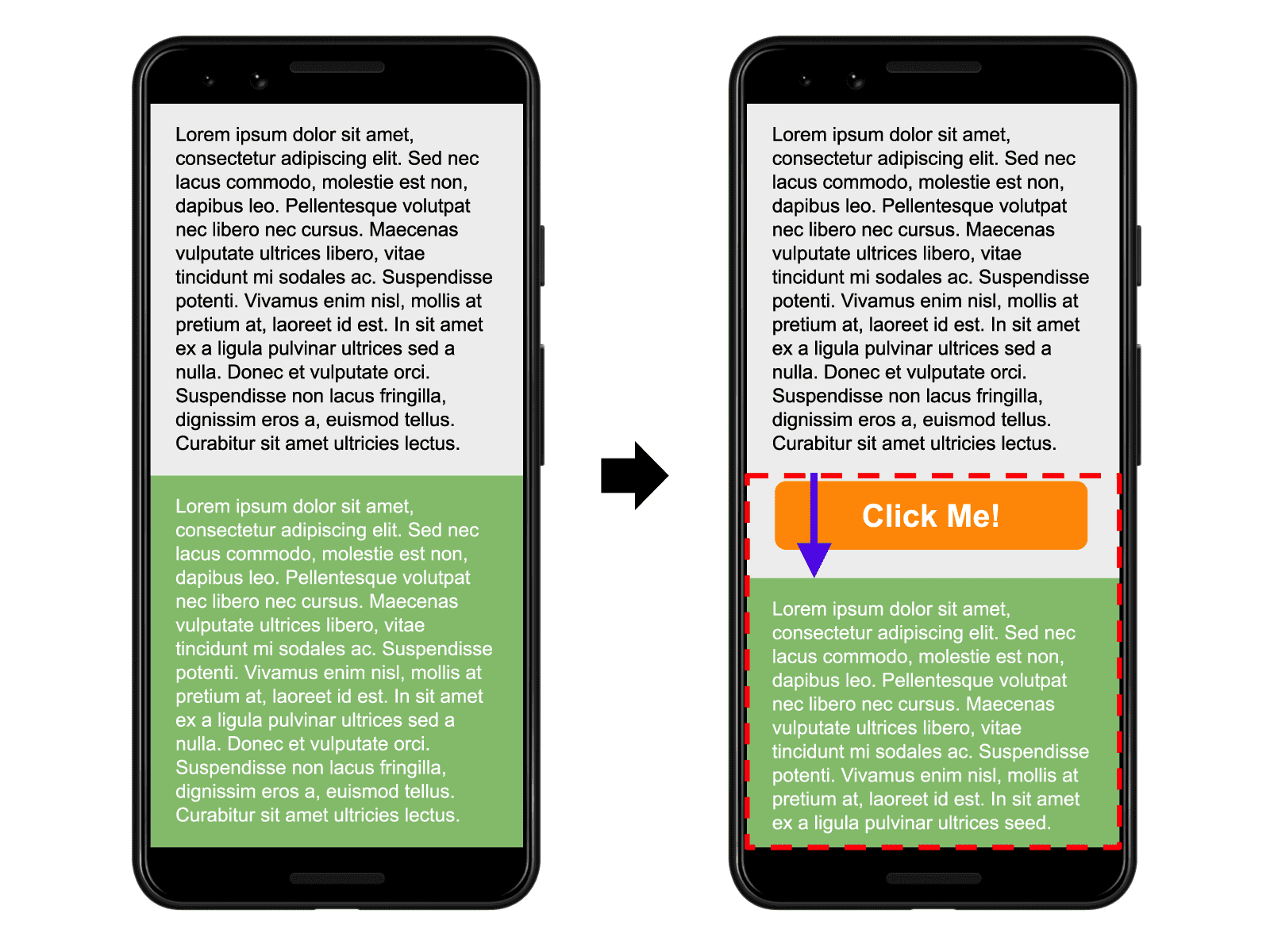

Layout shifts frustrate users and hurt Google scores.
Common CLS Causes in Shopify
-
Images without defined dimensions
-
Lazy-loaded banners pushing content
-
Late-loading fonts
-
Popups appearing suddenly
Top Shopify Page Builder Apps (2026) — Build & Optimize Your Store Pages Without Code
How to Fix CLS Properly
-
Always define image aspect ratios
-
Avoid dynamic content above the fold
-
Load fonts correctly
-
Use banners carefully
A visually stable store feels premium and trustworthy.
6. JavaScript & Fonts: Less Is More

Too much JavaScript = slow interaction.
Font Optimization Tips
-
Use 1–2 font families only
-
Avoid heavy font weights
-
Prefer system fonts if possible
-
Disable unused fonts
Fonts load on every page — keep them light.
7. Mobile Speed: Where Most Stores Fail

In 2026, over 75% of Shopify traffic is mobile.
Mobile users:
-
Have slower networks
-
Scroll faster
-
Leave quickly
Mobile Speed Best Practices
-
Simplify mobile layout
-
Reduce sections on homepage
-
Avoid sliders
-
Test real devices
Google evaluates mobile performance first.
8. Testing Speed the Right Way (Avoid False Data)

Best Tools for Shopify Speed Testing
-
Google PageSpeed Insights
-
Lighthouse (Chrome DevTools)
-
Shopify Speed Report
📌 Don’t panic over lab scores — focus on real user metrics.
9. Speed, SEO & Conversions: The Hidden Connection
A fast store:
-
Improves dwell time
-
Reduces bounce rate
-
Increases pages per session
-
Boosts conversion rate
Even a 1-second improvement can increase conversions by 10–20%.
Speed is not technical — it’s psychological.
10. Speed Checklist for 2026 (Quick Reference)
✔ Lightweight theme
✔ Optimized images
✔ Limited apps
✔ Stable layout
✔ Mobile-first design
✔ Clean fonts
✔ Regular speed testing
Follow this consistently and results compound.
Final Thoughts: Speed Is a Long-Term Advantage
In 2026, speed is not optional.
It’s part of your:
-
SEO strategy
-
Conversion strategy
-
Monetization strategy
-
Brand credibility
A fast Shopify store:
-
Feels trustworthy
-
Ranks higher
-
Converts better
-
Scales easier
If you focus on speed now, everything else becomes easier later.


